External Offers
Not every part is on a distributor feed. You may have a manufacturer-direct quote, a negotiated contract price, a local supplier, a broker, or a part you had made to order. PartsBox gathers online distributor offers automatically, but you can also add your own — in the app these are called local offers.
Entered once, ranked like any offer
Add an offer to a part — from the part itself or from within a project — and enter what you know: the vendor, the SKU, the price with its price breaks, a minimum order quantity, an order multiple, the currency, and a link. An offer can also carry a reference, comments, an expiration date after which it is ignored, and attached files such as the quote or the invoice it came from, so the paper trail lives on the offer.
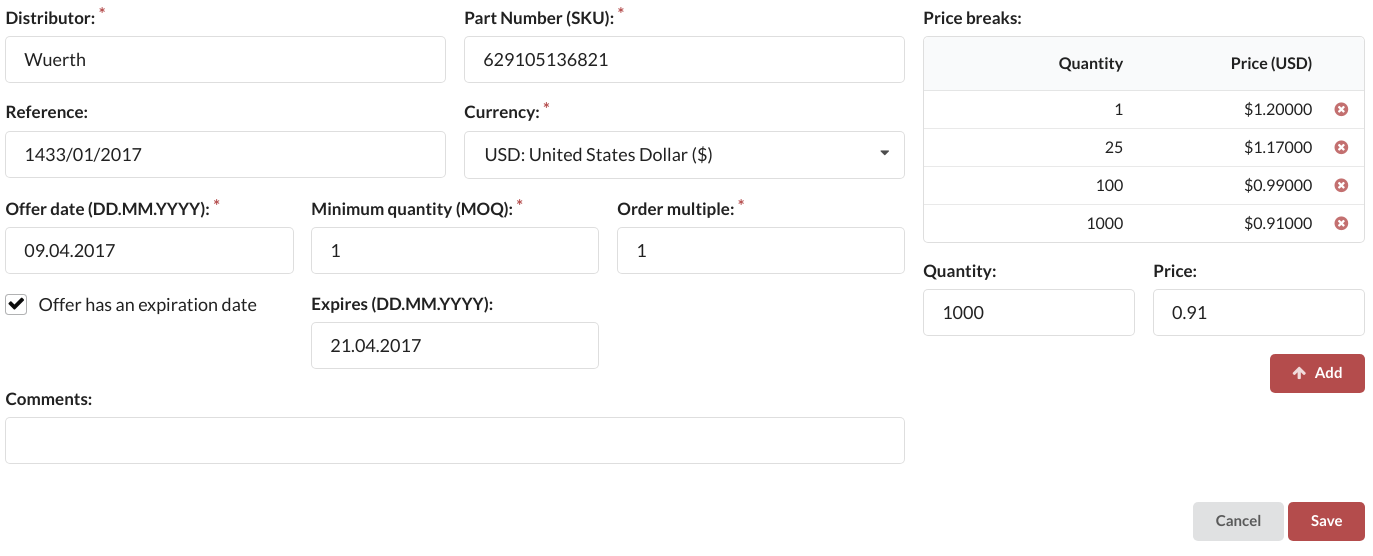
From then on your offer sits in the same table as the online distributor offers and is treated exactly like them. PartsBox ranks it by effective price, respects its price breaks and minimum order quantity, and can buy from it in a purchase list or an order. A quote entered in euros ranks directly against a catalog price in dollars, converted through multiple currencies.
Rules and boundaries
Vendor rules work with external offers as with any vendor. You can prefer them, exclude them, or write a rule that uses your own offers only — useful when a contract price should always win over the open market.
External offers are added to a specific part, not to a meta-part; to price a group by your own supplier, add the offer to the member part, and pricing finds it through the group. A part measured by length, weight, or volume takes offers in whole vendor packages, and PartsBox converts to the part's unit using its package quantity, so an external offer prices and stocks correctly next to the online ones.
External offers are part of purchasing, which starts on the Essentials plan.