Meta-parts: Substitutes
A meta-part is a group of parts that are interchangeable for your purpose, used as if it were a single part. PartsBox treats it like a normal part but delays the choice of which member to actually use until the choice has to be made — when you price a BOM or place an order. That is exactly when you want to decide, because the cheapest available member changes with price, stock, and quantity.
This matters most for passives, where any of a dozen manufacturers will do. A 0402 X5R 100nF 25V capacitor might be any of:
- Murata GRM155R61E104KA87D
- Taiyo Yuden TMK105BJ104KV-F
- TDK C1005X5R1E104K050BC
- Samsung CL05A104KA5NNNC
- Kemet C0402C104M3PAC7867
Rather than committing to one in the BOM, create a meta-part — say C0402-100NF-25V — that holds all of them. When PartsBox prices the BOM, it gathers offers for every member and picks the least expensive for the build quantity and your chosen vendors. For a contract manufacturer pricing a customer BOM that does not name exact parts, this is how you price passives quickly and keep the saving as prices move.
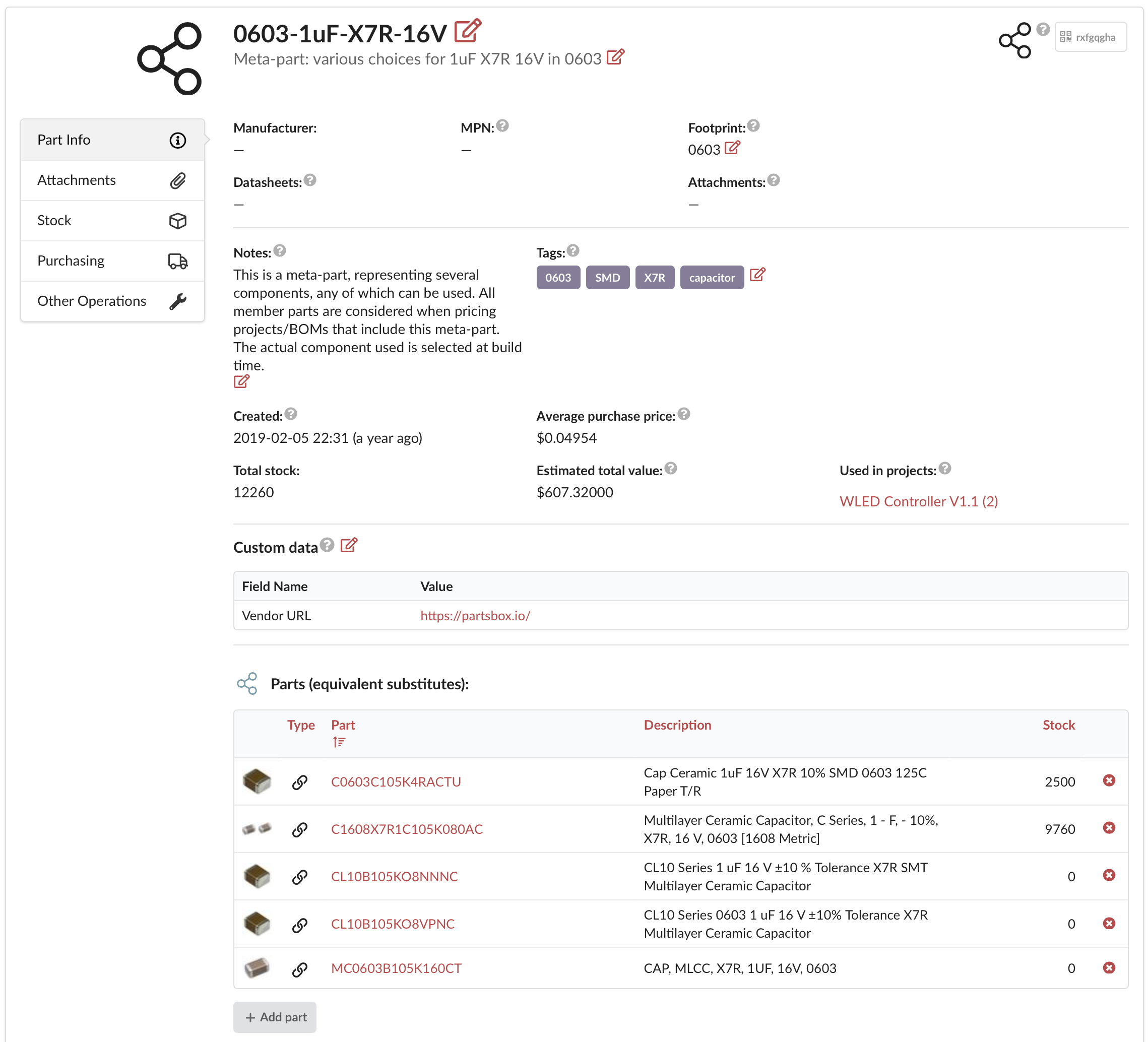
It works for more than passives. The NXP MPXV7002DP pressure sensor can often be replaced by MPXV7002DPT1 or MPXV7002GP, whichever is cheaper or in stock. Packaging variants are another everyday case: 'TPS61161DRVR' and 'TPS61161DRVT' are the same silicon on a different reel, and a meta-part named 'TPS61161DRV' manages both as one. Interchangeable versions of a sub-assembly — "Control Module v1.1" and "v1.2" — group the same way.
Stock and alerts for the whole group
A meta-part shows the combined stock of all its members, so the question "do I have enough 100nF 0402 capacitors" has one answer even when the parts sit in five different bins under five manufacturer names. Low-stock warnings work at the meta-part level too: set a threshold on the group and reorder when the total runs low, regardless of which member is depleted.
Each member remains a normal part — linked or local — with its own stock, its own offers, and its own history. Your own local offers attach to member parts rather than to the meta-part itself, and pricing finds them through the members. When you build, the line can be filled from any member's stock. A part's "used in projects" list follows these references, so a member shows the projects it reaches through its meta-parts.
Suggested substitutes
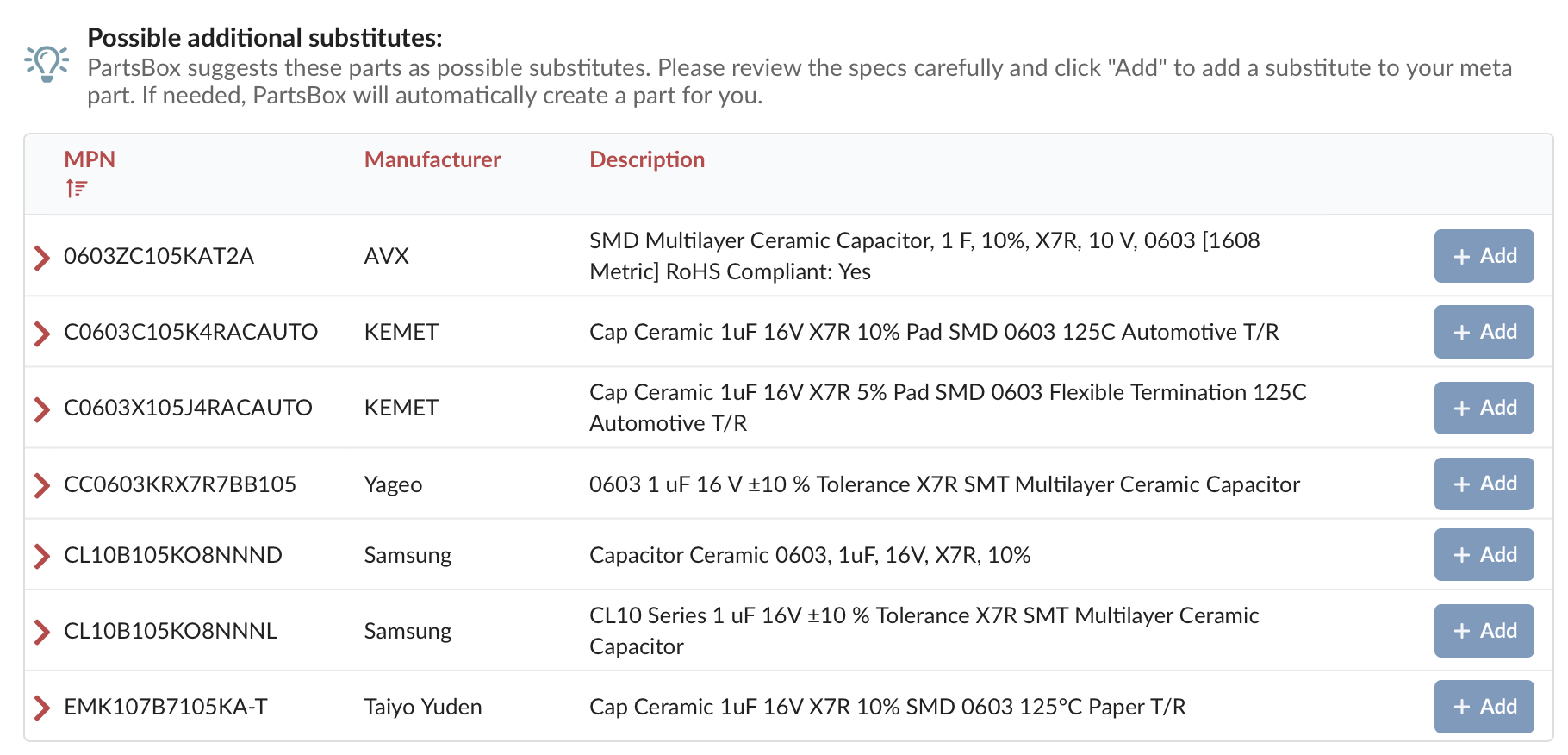
When you build a meta-part, PartsBox suggests further substitutes based on what other users group together, ranked by how common they are. Add one with a click.
In your CAD library
A meta-part can carry KiCad and Altium library data — symbols, footprints, and references — so your schematic points at C0402-100NF-25V rather than at one manufacturer. The design stays generic, and the manufacturer decision happens where it belongs: at purchase time, on current prices.
Parts measured by length, weight, area, or volume
A meta-part has its own unit, and its members must use a unit in the same category. A meta-part measured in centimeters can hold members measured in inches or feet, but not in grams. A meta-part with no unit can only hold members counted in pieces. The combined stock is shown in the meta-part's own unit, converting members tracked in other units of the same category. A single part can belong to several meta-parts with different units — a wire can be in one meta-part tracked in meters and another in feet — so each project works in the unit that suits it.
Converting an existing part
If a part already has stock and history and you realize it should be one of several alternatives, convert it to a meta-part directly instead of starting over. The original part becomes the first member and keeps all its stock and history. You can pull in its existing substitutes as members, rename the meta-part, and choose whether to move attachments. Project and list entries are repointed to the new meta-part automatically. The full steps are in the User's Guide.
Meta-parts are one of three levels of substitution in PartsBox, next to part substitutes and BOM substitutes; at pricing and build time all three combine. Meta-parts are in every plan, including the free Maker plan.