Configurable Tables
No two people read a table the same way. A buyer wants price and stock, an engineer wants footprint and datasheet, someone reconciling inventory wants location and quantity. PartsBox lets you shape every table to fit what you are doing.
In configuration mode you can add or remove columns from the full set a table offers, drag them into the order you want, and resize them by dragging the handles between headers. Click any sortable column to sort by it, and click again to reverse the direction; a table can sort by a primary column with a second column as the tie-breaker.
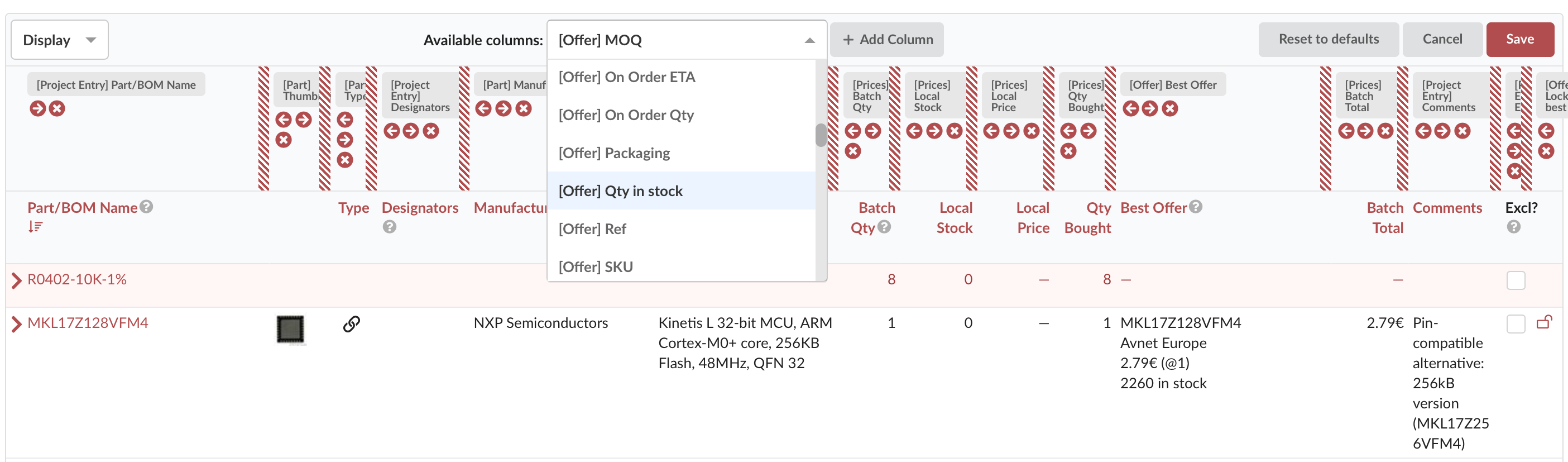
Each table remembers its own layout and keeps it across sessions, so you set it once and it is there next time. You can also keep separate layouts for what you see on screen and for what you export, because the columns that make a good working view are rarely the columns you want in a PDF or a CSV.
Layouts are personal: rearranging your columns changes nothing on a colleague's screen. When a layout is worth sharing — the purchasing review, the inventory count sheet — save it as a company-wide configuration preset and the whole team loads it by name.
This works the same everywhere in PartsBox: parts, projects, orders, storage, lots, and builds all configure the same way, as do filtering and export.
Configurable tables are in every plan, including the free Maker plan.